Beengo
Beengo started with a simple question: what if learning a new language could begin from the world around you?
Not from a textbook. Not from a memorized list. Not from another generic flashcard app. But from the objects, places, and moments you see every day.
You point your camera at something, tap it, learn the word, save it, review it, hear it, use it in a story, practice speaking, and slowly turn your environment into a living language classroom.
The project was built through an AI-assisted development workflow — or what many people call vibe coding — but not in the shallow sense of “write a prompt and get an app.” The real work was in shaping the product logic, designing the user experience, debugging broken assumptions, refactoring flows, protecting user data, and deciding what was actually ready for users.
| Year | 2026 |
| Role | Product Designer / Builder |
| Platform | iOS, Android, Website, Admin Panel |
| Status | Mobile app in testing and debugging; website and admin panel are live |
| Focus | AI UX, mobile product design, product systems, AI-assisted development |
Overview
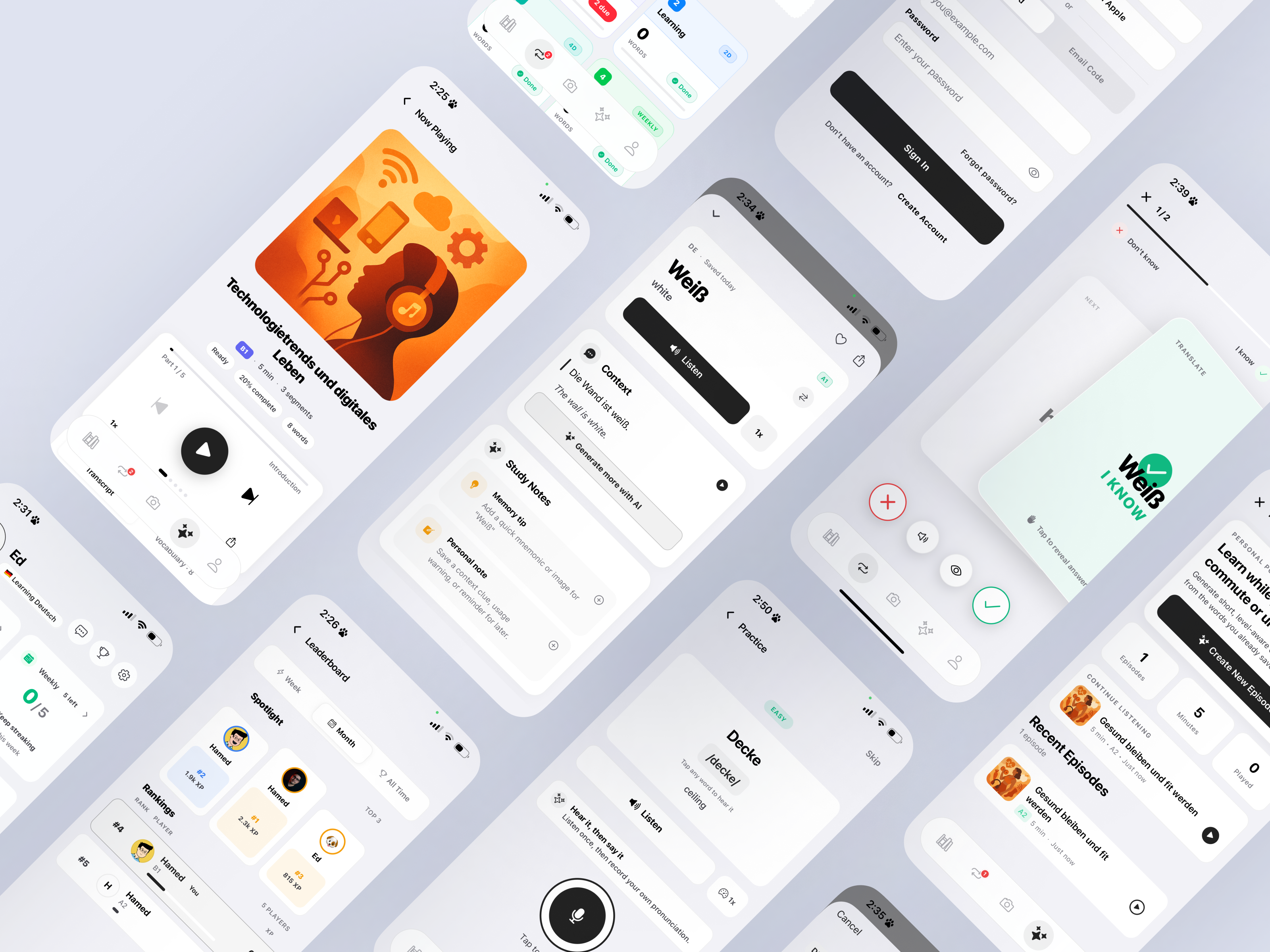
At first, I imagined Beengo as a small AI-powered language learning tool. As I continued building it, the project evolved into a functional end-to-end product system with camera scanning, object recognition, vocabulary saving, spaced repetition, AI-generated stories, podcasts, pronunciation practice, quizzes, conversation scenarios, subscription and quota logic, user settings, feedback flows, notifications, and an operational admin panel.
The mobile app is currently in the testing and debugging phase and is planned to be published soon for both iOS and Android. The website and admin panel are already live, which allows me to manage content, monitor product behavior, and prepare the product for release.
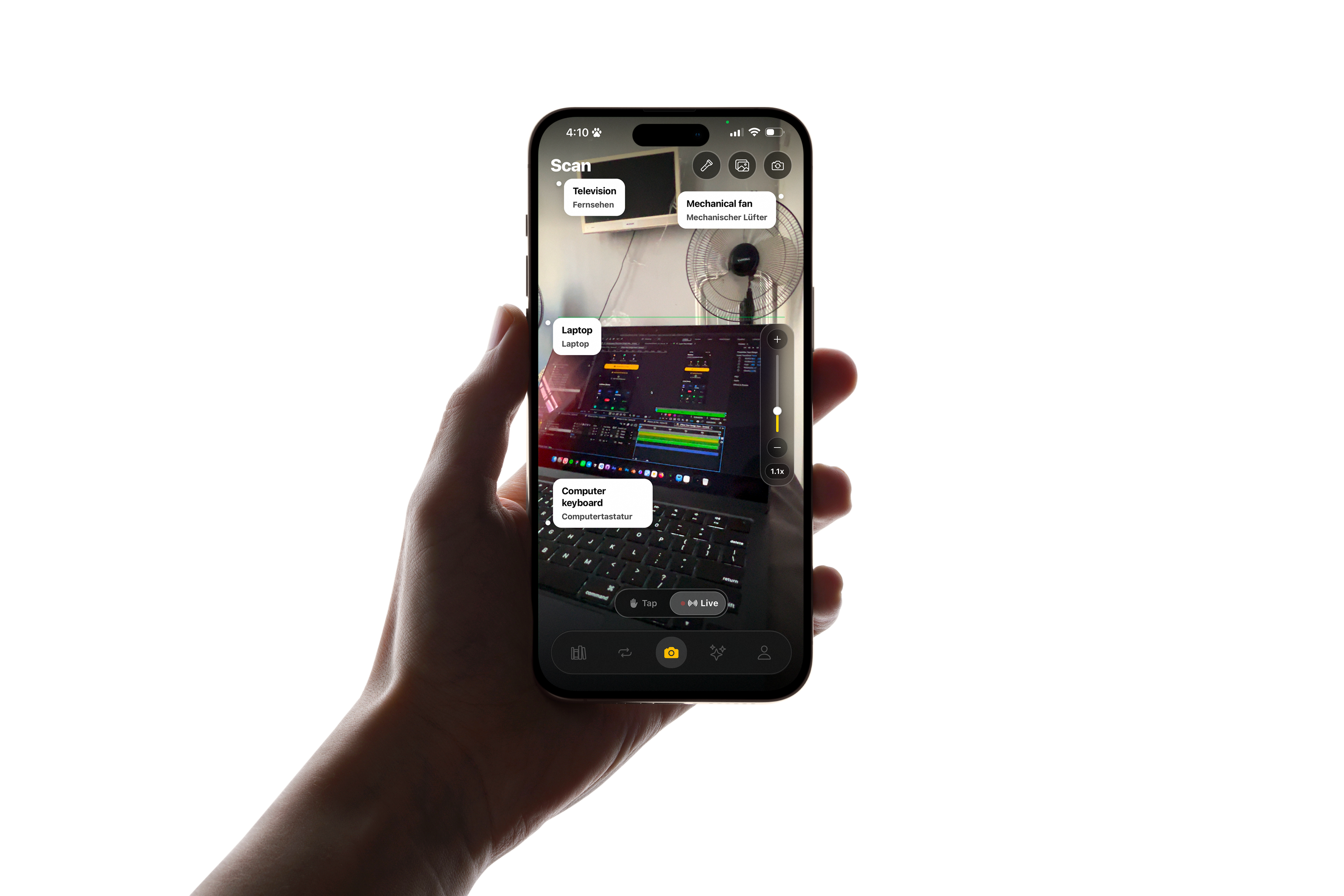
Project status
Beengo is a functional AI-assisted product MVP built to explore how language learning can become more contextual, personal, and connected to the physical world.
The mobile app is not publicly released yet. It is currently being tested, debugged, and refined before publishing on iOS and Android. The website and admin panel are already live, giving the product an operational layer beyond the mobile experience.
The goal was not only to design screens, but to understand what it takes to move from an AI product idea to a working system with real product rules, backend constraints, user ownership, privacy considerations, quota logic, and release-readiness requirements.
Why I built Beengo
As someone who has lived between different languages, countries, and cultures, I know that language learning is not only about grammar. It is about confidence, context, memory, repetition, and emotional connection.
Most language learning apps are structured around predefined lessons. That can be useful, but it often feels disconnected from real life. I wanted to explore a different approach: what if users could build their vocabulary from their actual surroundings?
- Tap a chair and learn its name
- Scan a passport and understand the word
- Save useful words into a personal library
- Review them later with spaced repetition
- Generate a story using those exact words
- Listen to the story like a mini podcast
- Practice pronunciation and speaking with AI
- Learn at their own CEFR level
The goal was not just to translate objects. The goal was to turn everyday moments into learning moments.
Why the name “Beengo”?
The name Beengo came from the idea of a bee. A bee moves from flower to flower, collecting small pieces of value and turning them into something meaningful. That felt close to the learning experience I wanted to create.
A user sees small words in the world, collects them, reviews them, connects them, and gradually builds real language ability. The bee identity also gave the product a friendly and memorable character without making it feel childish.
Overall product flow
The core flow connects the physical world to personal learning. A user scans or enters a word, saves it to their private vocabulary library, reviews it through spaced repetition, and then uses the same vocabulary across AI-generated practice modes.

Scan, tap, or add manually
The user can discover words through camera scanning, image input, live detection, or manual entry.
Translation, examples, audio
Each word is enriched with translation, pronunciation, examples, CEFR level, and word type.
Private vocabulary library
Saved words belong to the user, respect language-pair settings, avoid duplicates, and sync across sessions.
Spaced repetition
Words move through Leitner-style boxes based on review performance and due dates.
AI-generated learning modes
Stories, podcasts, quizzes, speaking practice, and chat scenarios are generated from the user’s saved vocabulary.
Progress, feedback, and settings
Users track XP, streaks, goals, history, notifications, and can report issues through the support system.
My role
I worked across the full product lifecycle. This was not only a design exercise; it became a real product-building challenge. I had to think like a product designer, product manager, frontend engineer, backend collaborator, QA tester, and founder at the same time.
What I built
Beengo includes several connected product areas, each with its own UX, technical, and operational reality.
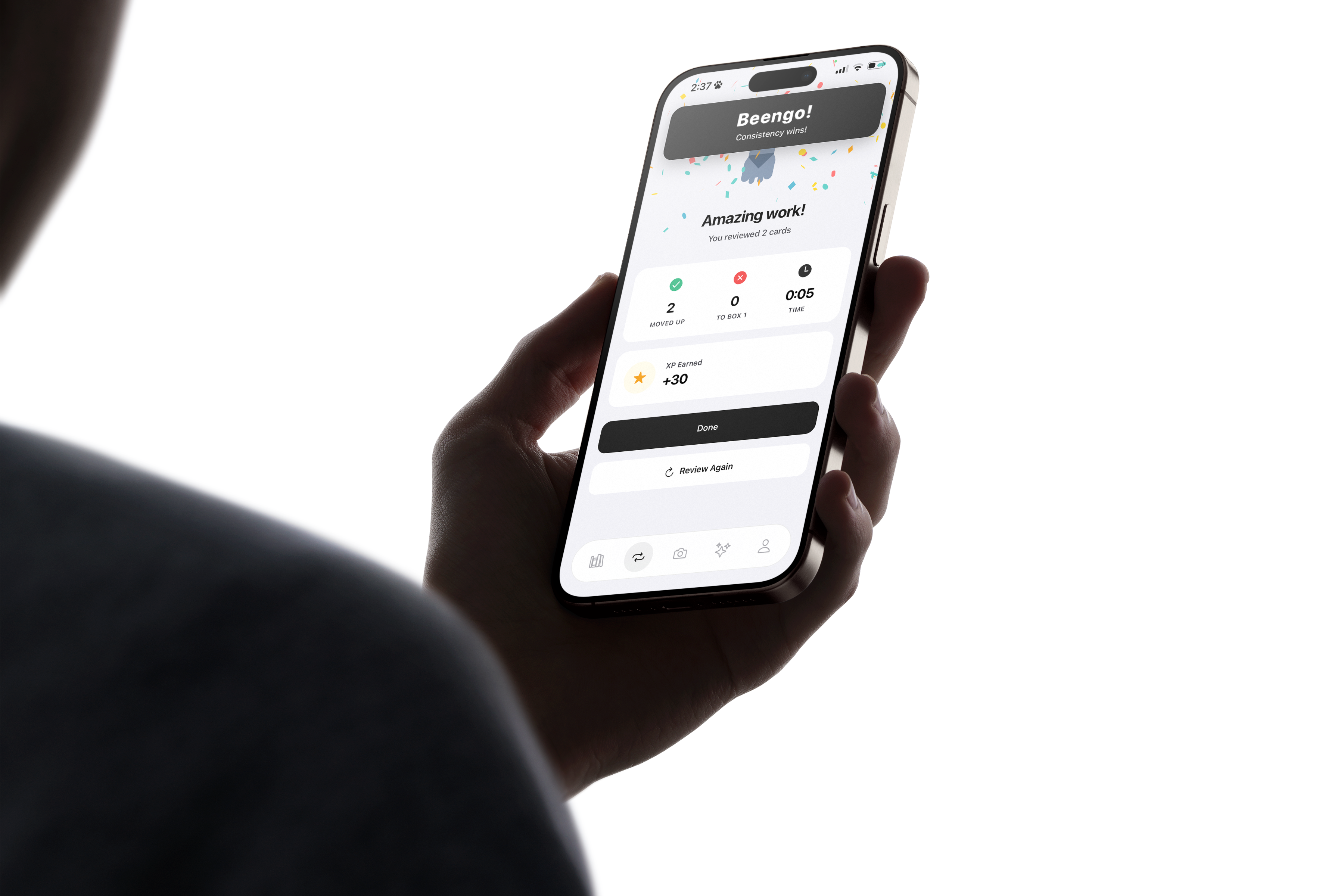
Tap an object, learn the word
The challenge was not just detecting an object. The system had to understand what the user tapped, avoid wrong dominant-object detection, translate correctly, return examples and pronunciation, handle quota, and prevent duplicates while keeping the interaction fast.
User-owned learning data
Designing a personal vocabulary library meant solving ownership, duplicate prevention, language-pair consistency, account isolation, logout/login sync, and privacy-safe data handling.
Limits users can understand
The product uses backend-enforced limits for free usage, while Pro users can unlock higher limits and additional AI functionality. This required the quota model to be clear, fair, and impossible to bypass from the client.
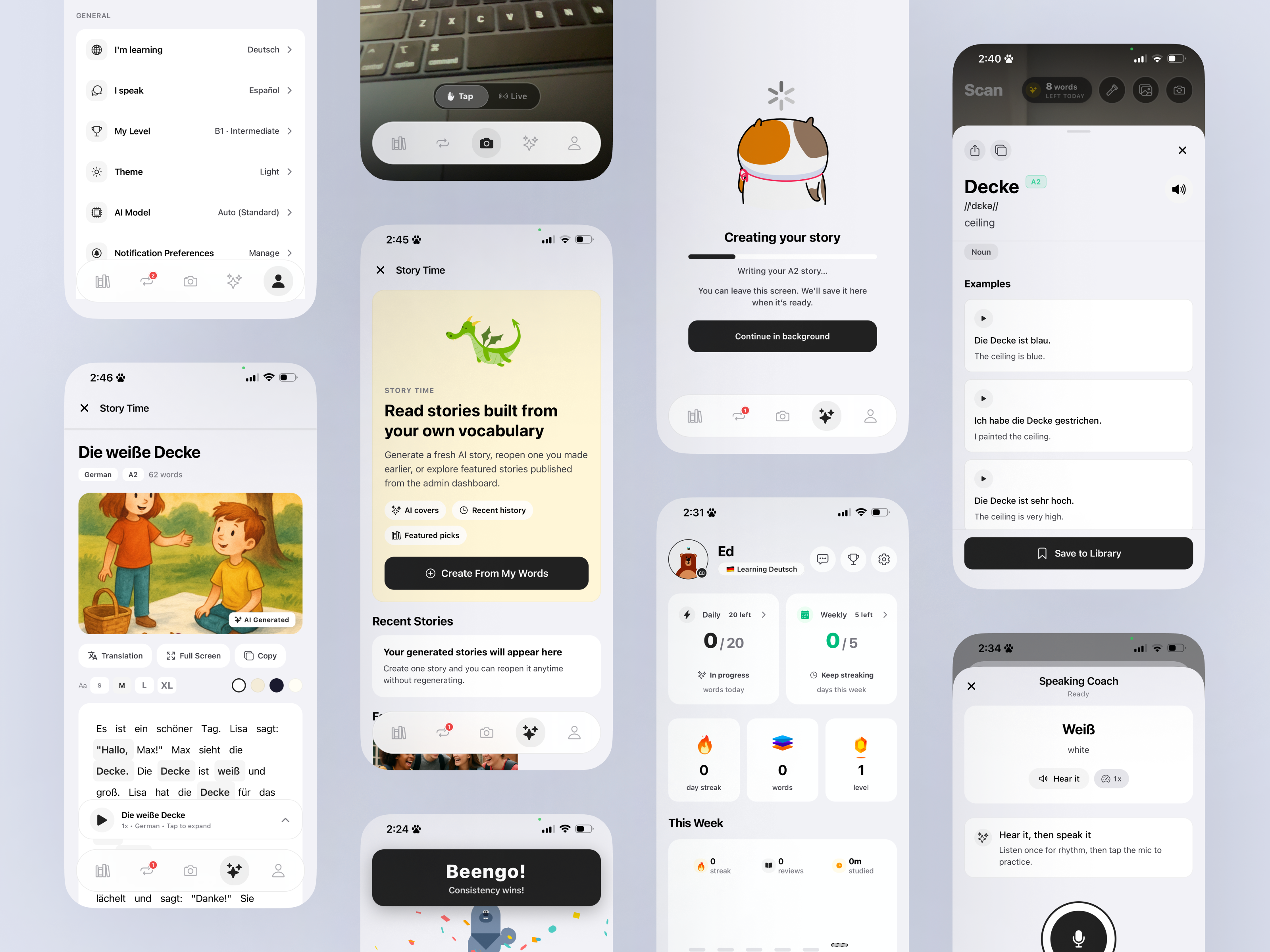
Stories from saved vocabulary
Users can generate level-aware stories from their saved words, with highlighted vocabulary, grammar tips, translation, audio playback, recent history, featured stories, and vocabulary practice.
Practice beyond flashcards
Beengo includes AI-generated podcasts, pronunciation practice, quizzes, and chat scenarios so users can review the same vocabulary through different learning contexts.
The product behind the product
The live admin panel supports the operational side of the product: users, subscriptions, feedback, featured stories, AI content, feature flags, remote config, system health, async jobs, provider status, and support workflows.
Camera scan: from object detection to learning moment
The camera scan flow became one of the most important parts of the product. The user expectation is simple: point the camera, tap something, learn the word. But behind that simple interaction, the product needed several layers of logic.
The system had to understand the user’s selected area, identify the object, translate it into the target language, show pronunciation, provide examples, allow audio playback, and let the user save the word to their library.
The hard part was avoiding a common AI UX problem: technically correct but experientially wrong results. If the user taps a ceiling but the model focuses on the whole room, the result breaks trust. That pushed me to think about tap-aware detection, region-of-interest logic, confidence handling, fallback states, and correction loops.
Vocabulary library and spaced repetition
The vocabulary library is the foundation of Beengo. Every saved word becomes part of the user’s personal learning system. From there, words can move into review sessions, AI stories, podcasts, quizzes, pronunciation practice, and chat scenarios.
I designed the review experience around a Leitner-style spaced repetition model. Users can see due words, day streaks, total words, review boxes, review intervals, and progress. They can also move words between boxes, archive words, delete words, or review all words in a specific box.
This turned a simple word list into a learning system with memory, progression, and ownership.
The quota lesson
One of the most important product lessons came from quota design. It is easy to say “users have limited scans” or “users have limited words,” but the exact wording changes the user’s mental model.
A scan that fails should not consume credit. A duplicate word should not consume credit. A word that already exists in the user’s library should not feel like a lost opportunity. Pro users should not be blocked by the same free limits.
This forced me to treat quota as a backend-owned product rule, not a frontend counter.
Story Time changed how I think about AI UX
The idea was simple: the user saves words, then Beengo generates a short story using those words at their language level. But the real requirements went much deeper.
Story Time needed CEFR levels from A1 to C2, selected vocabulary, highlighted learned words, grammar tips, translations, audio playback, recent history, generated covers, featured stories, and a clean split between private user-generated stories and admin-published content.
AI generation is not just about waiting for output. A good AI product needs:
- Progress states
- Async handling
- Safe background generation
- Notification when content is ready
- Retry logic
- Failed states
- Editing and publishing logic
- Ownership and visibility rules
- Admin moderation
Practice with AI
Beengo’s AI practice area turns saved vocabulary into multiple learning formats. I wanted users to practice the same words through reading, listening, speaking, recall, and conversation — not just flashcards.
Read with context
Users generate level-aware stories from their own vocabulary and review highlighted words inside a meaningful narrative.
Listen while learning
Users can generate short, themed audio episodes from their saved words and continue learning while commuting or resting.
Hear it, then say it
Users listen to a word, record their own pronunciation, and receive feedback while the app respects target language and level.
Recall and explain
The app generates questions from saved vocabulary, shows correct and wrong answers, and provides explanations after each answer.
Practice real scenarios
Users can choose practical scenarios like asking for directions, restaurants, airports, or doctor visits, then practice through AI conversation.
These modes helped me think of AI learning as a system of connected practice loops instead of isolated features.
Admin panel and operational layer
A product is not ready just because the user-facing app looks good. Beengo also needed an operational layer for managing the product after release.
The website and admin panel are already live, and the admin system was designed to support product operations, not just database editing.
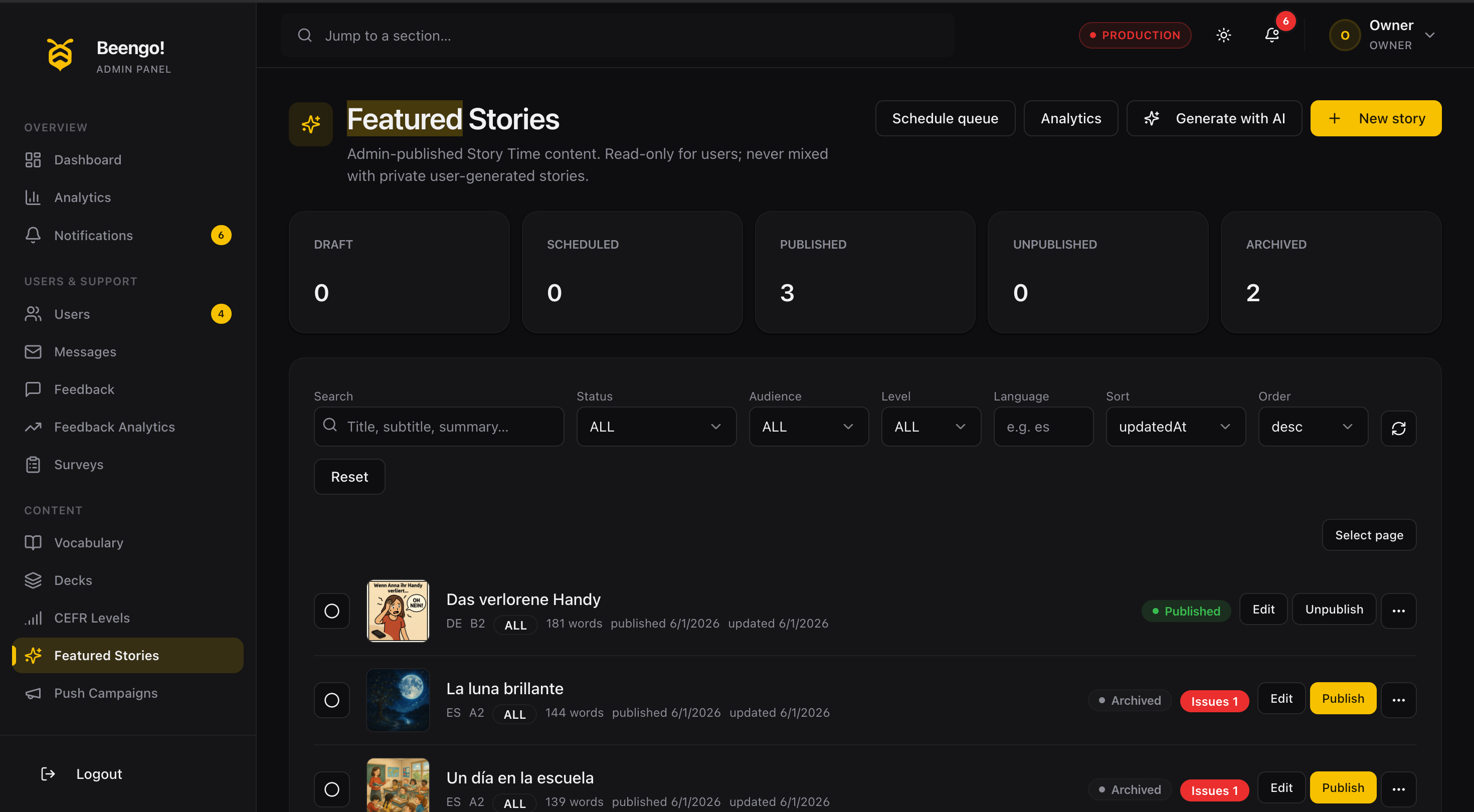
This changed how I looked at product design. Internal tools are not secondary. They define whether the product can be supported, moderated, improved, and scaled.
The biggest challenge: AI-assisted building at scale

At the beginning, AI-assisted development felt extremely fast. I could describe a screen, generate components, create flows, connect APIs, and test ideas quickly.
But as the product became more complex, the limitations became very clear.
This is where technical literacy became critical. Without understanding code structure, API contracts, data models, authentication, state management, database relations, and error handling, I would not have been able to guide the AI properly.
Why technical literacy matters for product designers
As a product designer, this project pushed me far beyond Figma. I was not only designing screens. I was designing systems.
A simple “Save to Library” button required decisions about duplicate detection, quota consumption, user ownership, API response shape, optimistic UI, error handling, paywall triggers, loading states, library refresh, localization, analytics, and backend validation.
This is why I believe modern product designers, especially those working with AI products, need technical literacy. Not necessarily to become full-time engineers, but to understand how products actually behave under the surface.
For me, vibe coding did not replace technical thinking. It made technical thinking more important.
Design system and UI direction
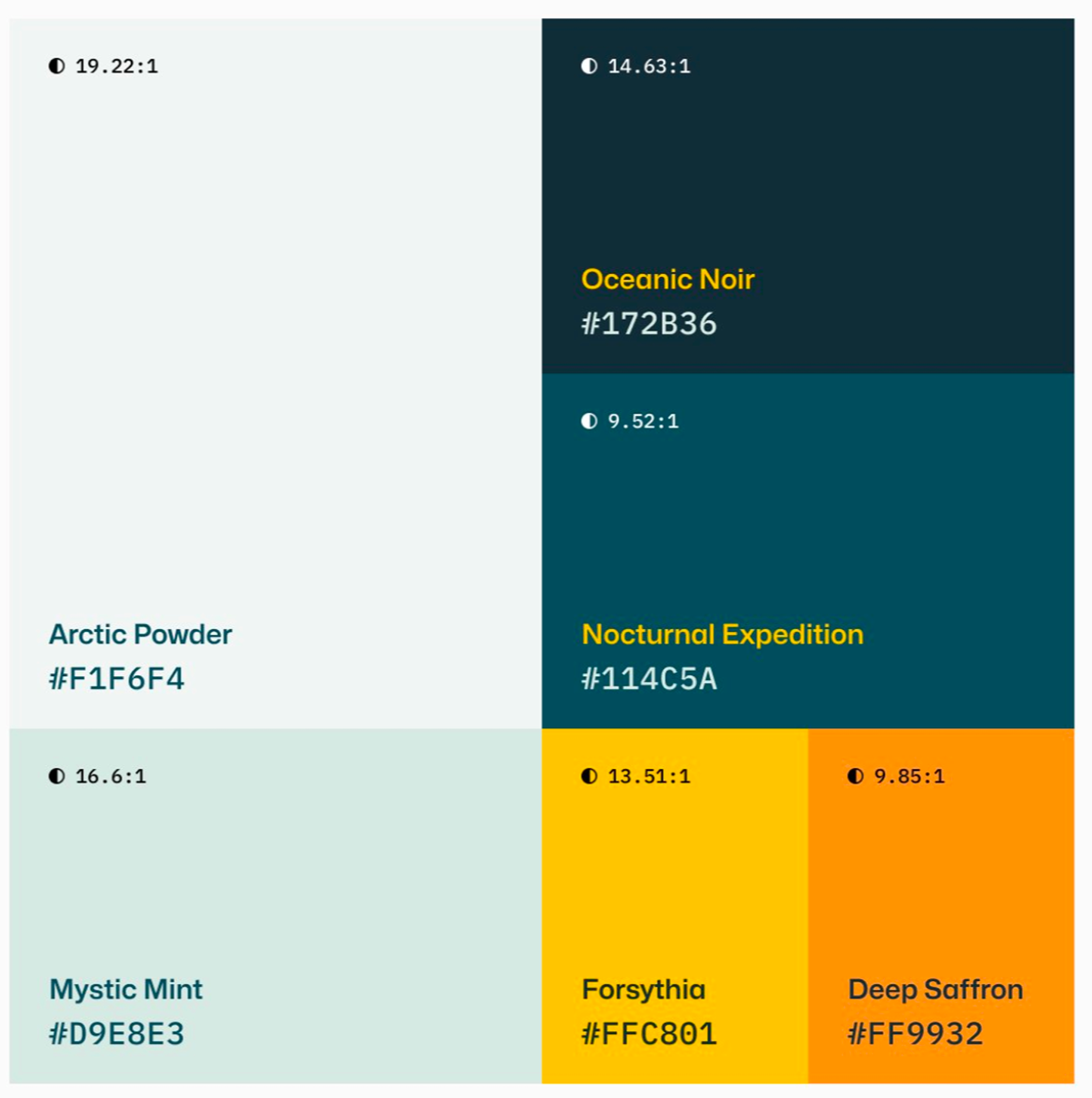
The visual direction was intentionally minimal, calm, high-contrast, and focused. I wanted the interface to feel fast and practical, while the bee identity added warmth and a small sense of playfulness.
The system supports both light and dark themes and includes reusable patterns for cards, badges, buttons, bottom sheets, loading states, empty states, error states, review cards, AI content cards, progress indicators, and action bars.
AI features are product systems, not just prompts
Beengo uses AI across object recognition, translation, vocabulary enrichment, CEFR classification, story generation, quiz generation, podcast generation, pronunciation feedback, conversation practice, admin content, and knowledge base caching.
The recurring lesson was simple: AI features need strong product boundaries.
For every AI feature, I had to define a full set of boundaries — not just the prompt and the response:
- 01Input — what the feature receives from the user or system
- 02Output — the shape and limits of what it returns
- 03Fallback — what happens when the model is unsure or unavailable
- 04Confidence — how certainty is measured and surfaced
- 05Error state — how failure is shown without breaking trust
- 06User correction — how people fix a wrong result
- 07Ownership — who the generated content belongs to
- 08Privacy — what stays private to the user
- 09Caching — what is stored and safely reused
- 10Cost control — how generation cost is managed
- 11Quota — how usage limits are enforced
- 12Admin visibility — what the team can see and moderate
A good AI feature is not only impressive when it works. It is trustworthy when it fails gracefully.
Challenges I faced
These were not just technical bugs. Many of them were product architecture problems.
- Fixing incorrect authentication states
- Preventing user data from appearing across accounts
- Aligning free and Pro subscription logic
- Debugging quota mismatches
- Redesigning broken loading states
- Removing redundant modals
- Improving story generation UX
- Connecting admin-featured stories to mobile
- Localizing the app beyond English assumptions
- Making AI outputs respect native and target languages
- Building feature flags and app control
- Thinking about push notifications and operational alerts
- Designing global object knowledge caching without leaking private data
- Making sure generated content belongs to the correct user
- Keeping the UI consistent while the codebase grew quickly
Key product lessons
Fast is not enough
A feature that works quickly but gives the wrong answer is dangerous. That pushed me toward tap-aware detection, confidence handling, alternatives, and correction loops.
Mock data is dangerous
If a feature depends on real AI, backend, user data, or subscriptions, it must be tested with real flows before calling it complete.
Backend is the source of truth
Quota, subscription, feature flags, ownership, privacy, and visibility cannot rely only on frontend state.
Admin tools are part of the product
If the admin cannot manage users, errors, flags, feedback, campaigns, and AI content, the product is not operationally ready.
AI-assisted building needs leadership
AI can produce a lot of code, but it needs direction. The human becomes architect, reviewer, product thinker, QA, decision-maker, editor, and systems designer at the same time.
Outcome
The result is a functional mobile-first product MVP with a live website and admin panel. The mobile app is currently being tested and debugged before publishing on iOS and Android.
End-to-end app experience
Designed and built the main mobile flows for scanning, saving, reviewing, practicing, and tracking learning progress.
Multiple learning modes
Created AI-generated stories, podcasts, quizzes, pronunciation practice, and chat scenarios connected to saved vocabulary.
Live website and admin panel
Built the foundation for managing users, content, feedback, feature flags, AI jobs, and product operations.
Rules beyond screens
Defined quota, subscription behavior, content ownership, privacy rules, language-pair logic, and backend source-of-truth patterns.
Testing and debugging
The current focus is QA, debugging, flow refinement, AI output quality, and preparing the app for public release.
What this project shows about my skills
Beengo became a strong example of how I work as a product designer in the AI era.
Idea to system
I can start from a product idea, define user flows, and turn it into a scalable UX system.
AI-assisted development
I can work with AI-assisted development tools while understanding technical trade-offs and product constraints.
Ownership and privacy
I think about user data, account boundaries, duplicate prevention, visibility, and privacy from the beginning.
Admin tools
I understand that internal tools, support workflows, and product monitoring are part of the product experience.
Interaction patterns
I design AI experiences with progress states, fallbacks, corrections, ownership, and graceful failure.
Release-readiness
I know the difference between a generated prototype and a product that can be tested, supported, and prepared for release.
Most importantly, Beengo shows that I do not see design as only screens. I see design as the connection between user needs, business rules, technical systems, and real product behavior.
What comes next
The next step is to complete testing and debugging, improve the reliability of AI outputs, refine the onboarding and paywall experience, continue polishing the review and practice loops, and prepare the mobile app for public release on iOS and Android.
Because the website and admin panel are already live, I can continue improving the operational side of the product while the mobile app moves toward publication.
The release focus is now:
- Testing real user flows end to end
- Fixing edge cases in scanning, saving, review, and AI generation
- Improving AI accuracy and fallback behavior
- Validating subscription and quota states
- Polishing empty, loading, error, and success states
- Preparing App Store and Google Play release materials
- Monitoring feedback and bug reports through the live support system
Final reflection
Beengo started as an experiment in vibe coding. But it became a deeper lesson about building real AI products.
I learned that AI can dramatically increase speed, but it does not remove complexity. It exposes complexity faster. The more powerful the tool becomes, the more important product judgment becomes.
For me, Beengo is not just an app. It is proof that a designer with technical understanding can use AI tools to build far beyond static prototypes — but only if they can think in systems, challenge generated code, protect the user experience, and keep asking the most important product question:
Visit Beengo
The website is live now. The mobile app is in testing and will publish soon on iOS and Android.